
 UCloud
Architecture and Networking
In this article we will go through the overall architecture and networking modes of UCloud/IM for Slurm. We will start by explaining the overall architecture, followed with a discussion on networking requirements.
Overall Architecture
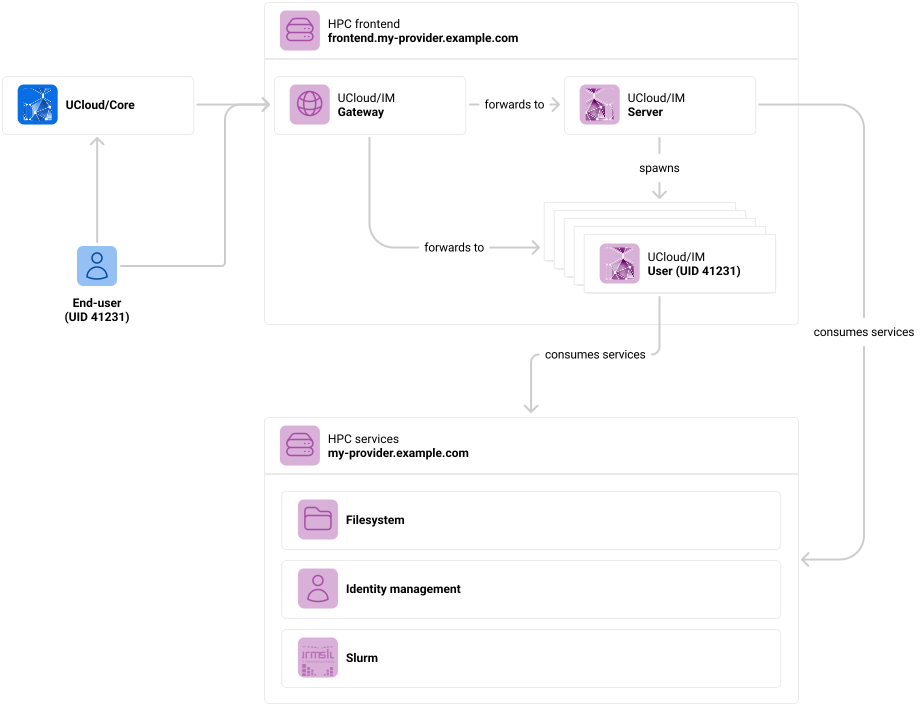
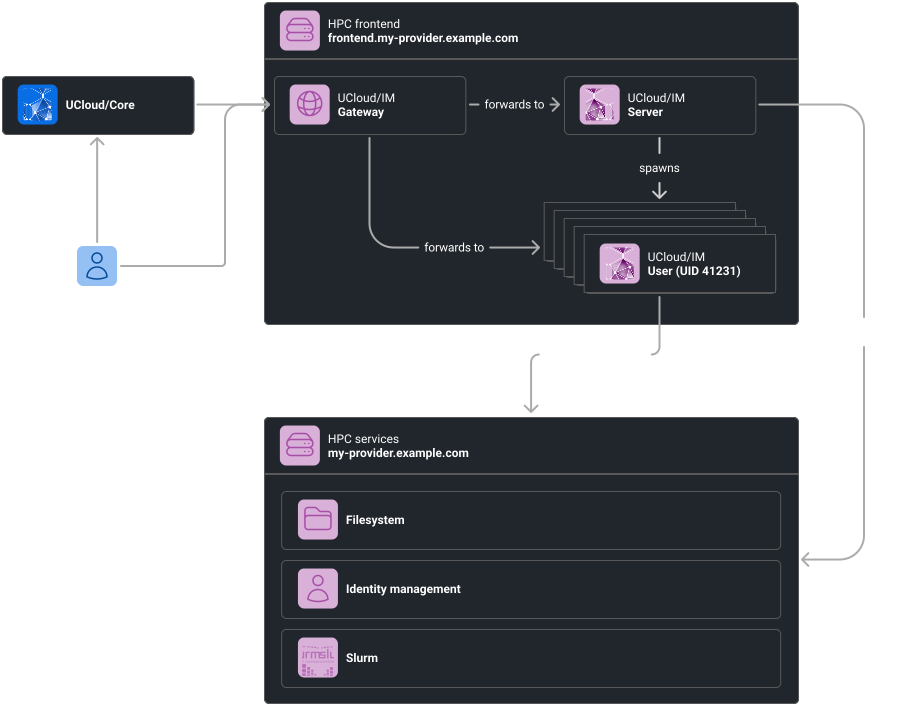
Overall architecture of UCloud/IM for Slurm-based HPC. This diagram depicts a production-like setup.
In the architecture above, we have several actors. We have summarised the role of each actor in the table below:
| Actor | Purpose |
|---|---|
| End-user |
The end-user is a user of the UCloud platform and of the service provider. As we have discussed in the introduction chapter, the end-user primarily communicates with UCloud/Core, and in rare cases directly with a service provider. In this diagram, we assume that the user has already gone through the connection procedure (TODO link) and has
established a mapping from a UCloud identity to a local identity with uid |
| UCloud/Core |
The UCloud platform itself. This is the service hosting the user-interface and core APIs. It is not part of the provider’s deployment. You can read more about the role of UCloud/Core here. The core will to a large extent, forward requests to service providers after performing validation, authentication and authorization. |
| HPC frontend |
UCloud/IM is hosted on the HPC’s frontend node (or a similar node). This node is capable of consuming the services of the HPC environment. |
| UCloud/IM (Gateway) |
The gateway is a publicly accessible web-server and is part of the integration module. It accepts all traffic destined to the integration module. In then forwards to either the UCloud/IM server instance or one of the user instances. It does this based on routing information from UCloud/Core or the end-user. Traffic which is related to a user action almost always goes to a user instance matching the UID of the end-user. |
| UCloud/IM (Server) |
The server instance of the integration module. This server is responsible for handling server-to-server traffic which is not related to an end-user request. For example, this server instance will tell UCloud/Core about which services it exposes. The server instance consumes some of the HPC services. This includes keeping track of Slurm jobs and reporting the state back to UCloud/Core. This also includes the creation of filesets, user identities, projects and Slurm accounts. It is the job of the server instance to start new user instances. The server instance is capable of doing this through
|
| UCloud/IM (User) |
One of the integration module server instances. These instances are launched by the UCloud/IM server instance on demand. Any end-user action through UCloud/Core will trigger the automatic launching of such an instance. This instance runs with the same privileges as if the user had logged in through other means. All authorization checks are enforced directly by the operating system. The user instance consumes HPC services via the normal means. This is done through the same mechanisms that your users would normally access your systems. |
| HPC services |
The HPC services are the services that make up your actual HPC environment. This includes systems such as:
UCloud/IM does not require these services to be deployed in any specific way. The diagram show these on a single node solely for illustrative purposes. The services can be deployed on any number of nodes. |
Examples
In order to better illustrate how this works, we will go through a number of examples show-casing common communication patterns.
Browsing Files
End-user→UCloud/Core: Request files at$PATHUCloud/Core→UCloud/IM (Gateway): Request files at$PATH- If
UCloud/IM (UID 41231)is running, skip to step 3 UCloud/IM (Gateway)→UCloud/Core: User is not readyUCloud/Core→UCloud/IM (Gateway)→UCloud/IM (Server): Spawn user instance- Go to step 2
- If
UCloud/IM (Gateway)→UCloud/IM (UID 41231): Request files at$PATHUCloud/IM (UID 41231)→UCloud/IM (Gateway)→UCloud/Core→End-user: File listing from$PATH
Uploading a File
End-user→UCloud/Core: Request upload at$PATHUCloud/Core→UCloud/IM (Gateway): Request upload at$PATH- If
UCloud/IM (UID 41231)is running, skip to step 3 UCloud/IM (Gateway)→UCloud/Core: User is not readyUCloud/Core→UCloud/IM (Gateway)→UCloud/IM (Server): Spawn user instance- Go to step 2
- If
UCloud/IM (Gateway)→UCloud/IM (UID 41231): Request upload at$PATHUCloud/IM (UID 41231)→UCloud/IM (Gateway)→UCloud/Core→End-user: Upload endpointEnd-user→UCloud/IM (Gateway)→UCloud/IM (User): File data
Starting a Job
End-user→UCloud/Core: Start job given$PARAMETERSUCloud/Core→UCloud/IM (Gateway): Start job given$PARAMETERS- If
UCloud/IM (UID 41231)is running, skip to step 3 UCloud/IM (Gateway)→UCloud/Core: User is not readyUCloud/Core→UCloud/IM (Gateway)→UCloud/IM (Server): Spawn user instance- Go to step 2
- If
UCloud/IM (Gateway)→UCloud/IM (UID 41231)→Slurm: Start job given$PARAMETERSUCloud/IM (UID 41231)→UCloud/IM (Gateway)→UCloud/Core→End-user: Job has been submitted to the queue
Followed by periodic monitoring by UCloud/IM (Server):
UCloud/IM (Server)→Slurm: List jobsUCloud/IM (Server)→UCloud/Core: Send job updatesUCloud/Core→End-user(s): Notify about relevant job updates
Networking Requirements
In this section, we will recap the requirements listed from the section above.
DNS and Certificates
In this section we will list DNS entries and accompanying TLS certificates required for your service. All certificates
must be signed by a trusted root CA. DNS entries must resolve through public DNS servers. In the table below we use
my-provider.example.com as a placeholder representing your provider, please replace this with whichever domain you
control (for example hippo.cloud.sdu.dk).
| Mandatory | Hostname | Resolves to | Purpose |
|---|---|---|---|
| Yes | my-provider.example.com | Gateway IP | Accepting general IM traffic (user and server) |
| No | *.my-provider.example.com | Gateway IP | Traffic destined for interactive applications |
The gateway IP refers to the IP address on which the UCloud/IM gateway listens. This must be a publicly routable IP address.
Firewall Configuration
| Protocol | Port | Source | Destination | Purpose |
|---|---|---|---|---|
| TCP | 80 | All | Gateway IP | Redirecting to HTTPS (443) |
| TCP | 443 | All | Gateway IP | Accepting IM traffic and interactive application traffic |
| TCP | 443 | Gateway IP | UCloud | Sending messages to UCloud/Core |