
 UCloud
Orchestration
UCloud orchestrates provider functionality by treating almost everything the user can create or manage as a resource. A resource is a platform level record that represents some provider backed capability, such as a job, a storage drive, a public link, a public IP, or a software license. UCloud uses this abstraction to coordinate work between UCloud/Core and a service provider, so users can interact with different providers through the same concepts and the same kind of lifecycle.
The key ideas are:
- A stable identity is attached to all resources. Even when the provider also has its own internal identifier for the same thing. This makes it possible to browse, audit, and reference resources consistently across providers.
- Resources are tied to a provider specified product. That product choice determines what the provider is expected to supply and what accounting rules apply. This is how UCloud connects orchestration to allocations and quotas without baking provider details into the user experience.
- UCloud keeps a catalog of resources. This catalog allows many read and listing operations to be served by UCloud/Core without contacting the provider every time, while still keeping the provider in the loop for changes and execution.
- Resources have ownership and permissions. Ownership is always a single workspace context, either personal or a project. Permissions are role based and are typically managed through project groups, which supports collaboration without requiring provider specific access control models.
- Resources evolve over time through updates. Providers can report changes, and those changes are reflected back to users through a consistent status model rather than provider specific state machines.
The job submission flow in the user interface is a concrete example of this orchestration model in action. Users start from an application entry and configure a run, but the orchestration hinges on selecting a machine type that maps to products available in the active workspace and on the chosen provider.
UCloud extends orchestration beyond the core job itself by letting users attach additional provider backed resources to a run when the app and provider support it. Examples include custom public links for interactive web interfaces and public IP addresses for externally reachable services. These are separate resources with their own lifecycle and permissions, but they can be associated with a job to compose a complete runnable environment.
The diagram below summarizes the significant steps involved in the submission of a job.
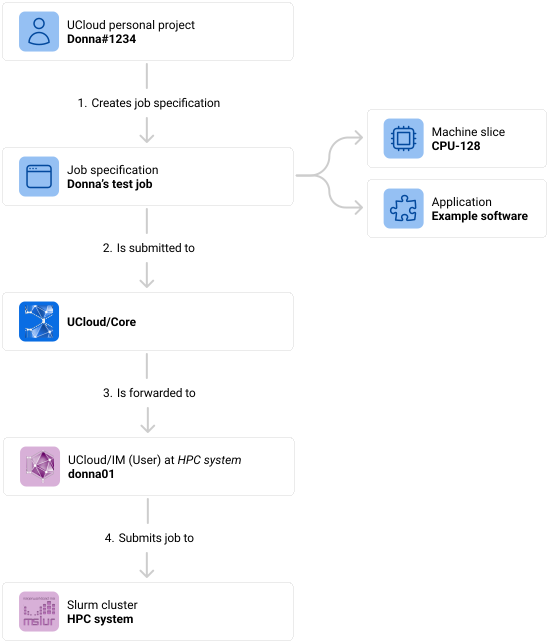
Figure showing the flow from a user submitting a job, going through UCloud/Core, and ending up at the service provider (UCloud/IM).
- The end-user creates a job specification. This step is typically done through the UCloud user-interface where the user can select from an application catalog. Once selected, the user will be selected with a variety of input parameters. These input parameters can be specific to the software, while others are related to how it should be scheduled.
- The job specification is submitted to UCloud/Core. Once the specification has been created, a network call is made to UCloud/Core. This call is authenticated as the user’s UCloud identity. Along with the request is also information about which project it should be executed as.
- UCloud/Core validates the request and forwards it to the relevant provider. UCloud/Core will validate, authenticate and authorize all parts of the request. Once done, it will find the appropriate service provider based on the request and forward the message.
- UCloud/IM accepts the job and passes it along to the underlying compute infrastructure.
Glossary and developer quick-start
| Term | Description |
|---|---|
| UCloud/Core | The central component hosting the UCloud platform. This is the primary contact point for UCloud’s user-interface. Start in core2/. |
| Service-provider (SP) | A provider of compute or storage resources to UCloud. Usually implemented via UCloud/IM. |
| UCloud/IM | The software implementing the provider API. Responsible for implementing storage and compute services. |
| Resource | A resource, often backed by a service provider, implements the core abstraction for managing a shared entity. Start in core2/orchestrator/resources.go. |
| Orchestration | Term used to describe the communication between UCloud/Core and UCloud/IM. Start in core2/orchestrator/resources_orchestration.go. |